If you have ever sat through a vendor demo and heard “HRIS” and “HRMS” used interchangeably, you are not alone. Most sales decks treat the two terms as synonyms. Most HR leaders treat them as synonyms too, right up until they buy the wrong system and realize it cannot do what they need.
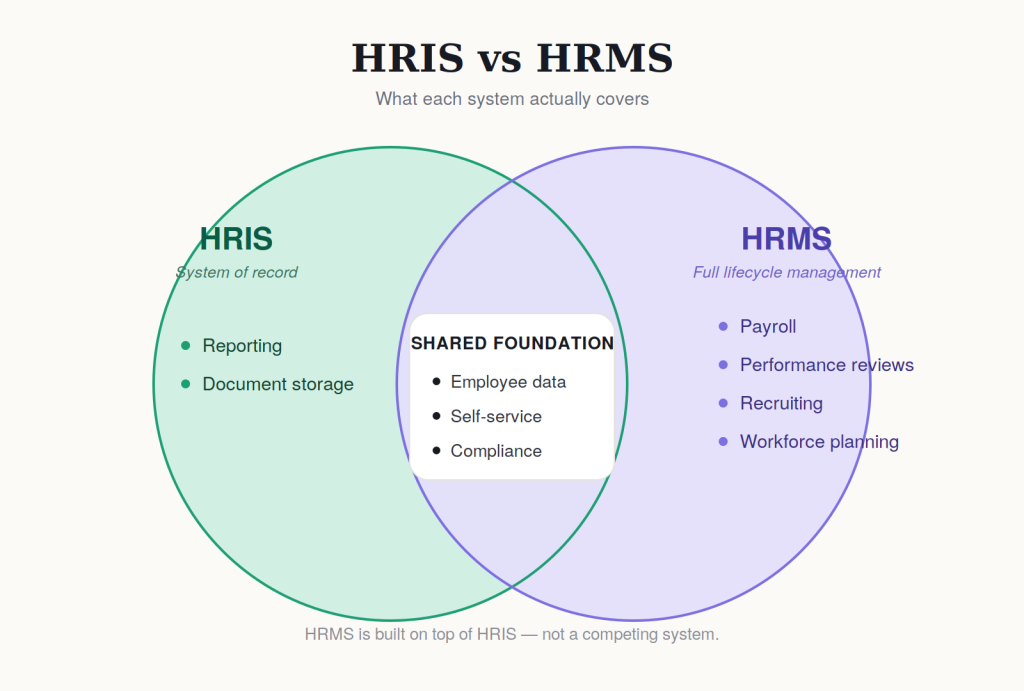
The truth is simpler than the marketing makes it sound. HRIS and HRMS are not competing categories. One is a subset of the other. Knowing where the line sits will save you money, implementation time, and a painful re-platforming project 18 months from now.
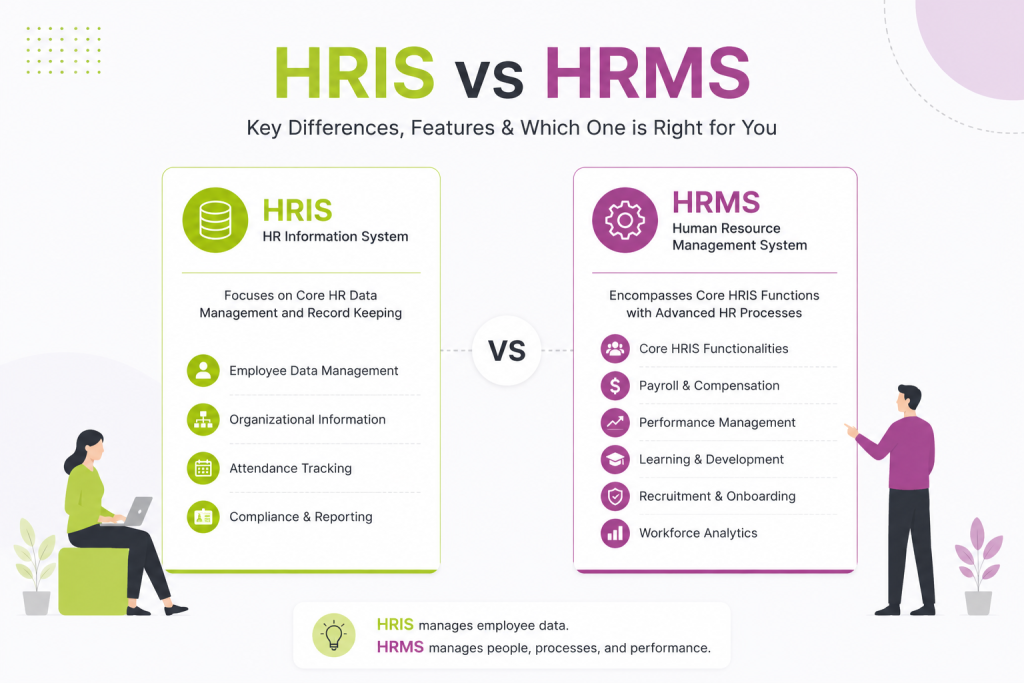
- HRIS = system of record. Stores employee data, time off, basic benefits, and compliance docs.
- HRMS = HRIS + process management. Adds payroll, performance reviews, recruiting, and workforce planning.
- Vendor labels are unreliable. Many “HRIS” tools now include payroll or recruiting, so check features, not the category name.
- Choose HRIS if your main problem is messy or untrustworthy employee data.
- Choose HRMS if your main problem is disconnected tools and manual reconciliation between systems.
- Compensation planning needs live data from performance, pay, and org structure. Most HRIS and generic HRMS tools handle this poorly, so evaluate it separately.
- Bottom line: buy based on which specific gaps a tool closes, not what it’s called.
What HRIS Actually Means
HRIS stands for Human Resource Information System. It is the system of record for employee data.
Think of it as the digital filing cabinet for your workforce. An HRIS typically handles:
- Employee records and personal information
- Job history and org structure
- Time off and leave tracking
- Basic benefits administration
- Compliance reporting and document storage
- Employee self-service for updating personal details
If your core need is “keep accurate data on every employee and make it easy to pull reports,” an HRIS covers you. It is built for data integrity, not decision-making.
Also read: How to Create a Total Rewards Statement Employees Actually Read
What HRMS Actually Means
HRMS stands for Human Resource Management System. It includes everything an HRIS does, then adds the tools that manage the employee lifecycle end to end.
An HRMS typically adds:
- Payroll processing
- Performance management and review cycles
- Recruiting and applicant tracking
- Learning and development modules
- Workforce planning and analytics
- Compensation management and planning
The distinction in one sentence: HRIS stores information. HRMS manages processes built on top of that information.
The Overlap That Confuses Everyone
Here is where it gets messy. Most vendors selling an “HRIS” today have bolted on payroll, basic performance tools, or a recruiting module. Most vendors selling an “HRMS” started as an HRIS and expanded outward.
So in practice, the labels on a product page tell you less than you think. A tool marketed as HRIS in 2026 might have more functionality than a tool marketed as HRMS from a smaller vendor. The category name is a starting point, not a spec sheet.
This is why the question “HRIS or HRMS” is less useful than the question “what does this specific tool actually do, and does it do the things I need.”
Also read: HRIS Integration: Connecting Payroll, Benefits, and Compensation Systems
How to Decide What You Need
Instead of chasing the label, work backward from your actual gaps.
You probably need HRIS-level functionality if:
- You are a small or early-stage company
- Your main pain point is scattered employee data across spreadsheets
- You need clean reporting for compliance or audits
- Payroll and performance are handled by separate specialized tools you already like
You probably need HRMS-level functionality if:
- You are scaling headcount and want fewer point solutions
- You are manually reconciling data between your HR system, payroll, and performance tools
- You want compensation planning tied directly to performance and org data
- Your HR team is stretched thin and needs workflow automation, not just storage
A useful gut check: if your biggest complaint is “I can’t trust the data” or “reporting is a mess,” that is an HRIS problem. If your biggest complaint is “our tools don’t talk to each other” or “this process takes too many manual steps,” that is an HRMS problem.
Also read: Pay Compression: How to Spot It and Fix It Before It Costs You Talent
Where Compensation Management Fits
This is the piece that gets left out of most HRIS vs HRMS comparisons, and it is often the piece that breaks first as companies grow.
Compensation planning needs live data: current pay, band placement, performance ratings, budget, and org structure, all in sync at the same time. An HRIS alone usually cannot do this because it was not built for planning workflows. A generic HRMS often treats compensation as an afterthought bolted onto payroll.
If comp planning is a real pain point for your team (annual cycles that take weeks, spreadsheet-based band tracking, no visibility into pay equity), that is worth evaluating as its own requirement, independent of which broader system label you land on.
The Practical Takeaway
Stop asking “HRIS or HRMS.” Start asking:
- What are the three things our current system fails to do?
- Which of those are data problems versus process problems?
- Does the tool we are evaluating solve those specific problems, regardless of what category it calls itself?
The vendor’s label on the box matters less than whether the tool closes your actual gaps. Buy for function, not for acronym.
FAQs-
1. What is the main difference between HRIS and HRMS?
HRIS stores and organizes employee data. HRMS includes everything an HRIS does, plus tools for managing processes like payroll, performance reviews, and recruiting. HRMS is the broader system built on top of HRIS.
2. Is HRMS better than HRIS?
Not necessarily. HRMS fits companies that need to manage the full employee lifecycle in one place. HRIS fits companies whose main need is clean, reliable employee data, especially if they already use separate tools for payroll or performance. The right choice depends on your gaps, not which system has more features.
3. Does HRIS include payroll?
Sometimes. Many vendors selling a product labeled “HRIS” have added payroll as a bolt-on feature. This is one of the biggest sources of confusion in the category. Always check the actual feature list rather than relying on the label.
4. Can a small business use an HRIS instead of an HRMS?
Yes. Most small and early-stage companies are well served by an HRIS, especially if payroll and performance are already handled by other specialized tools. Upgrading to a full HRMS usually makes sense once headcount grows and disconnected tools start creating manual work.
5. Where does compensation management fit into HRIS vs HRMS?
It fits into both, but often poorly. Compensation planning needs live data from pay, performance, and org structure at the same time. A basic HRIS usually cannot support this, and many HRMS platforms treat comp planning as a minor add-on to payroll. If comp planning is a real pain point, it is worth evaluating as a separate requirement.