Managing a workforce has never been a simple task. Between tracking employee records, processing payroll, managing benefits, and staying compliant with labor laws, HR teams carry an enormous operational load. For decades, companies managed all of this through on-premise software — systems installed on local servers, maintained by internal IT teams, and updated through expensive, disruptive upgrade cycles.
Cloud-based HRIS changed that equation. Today, organizations of every size can access enterprise-grade HR infrastructure through a browser, scale it as they grow, and leave the infrastructure headaches to someone else. But not all platforms are created equal, and choosing the right one requires understanding what these systems actually do and what separates a good implementation from a frustrating one.
TL;DR
- A cloud-based HRIS is a subscription HR platform that centralizes employee data, automates core processes, and is accessed via browser — no on-site servers required.
- It acts as a single source of truth for payroll, benefits, time-off, compliance, and employee records — with self-service portals for both staff and managers.
- Key capabilities include workflow automation (onboarding, approvals, review cycles), API integrations with your ATS, accounting, and LMS tools, and built-in reporting and analytics.
- Compared to on-premise systems, cloud HRIS delivers lower costs, faster setup, automatic updates, remote access, and stronger security infrastructure managed by the vendor.
- When evaluating platforms, prioritize ease of use, integration depth, multi-jurisdiction payroll support, transparent pricing, and guaranteed data portability if you switch.
What is a Cloud-Based HRIS?
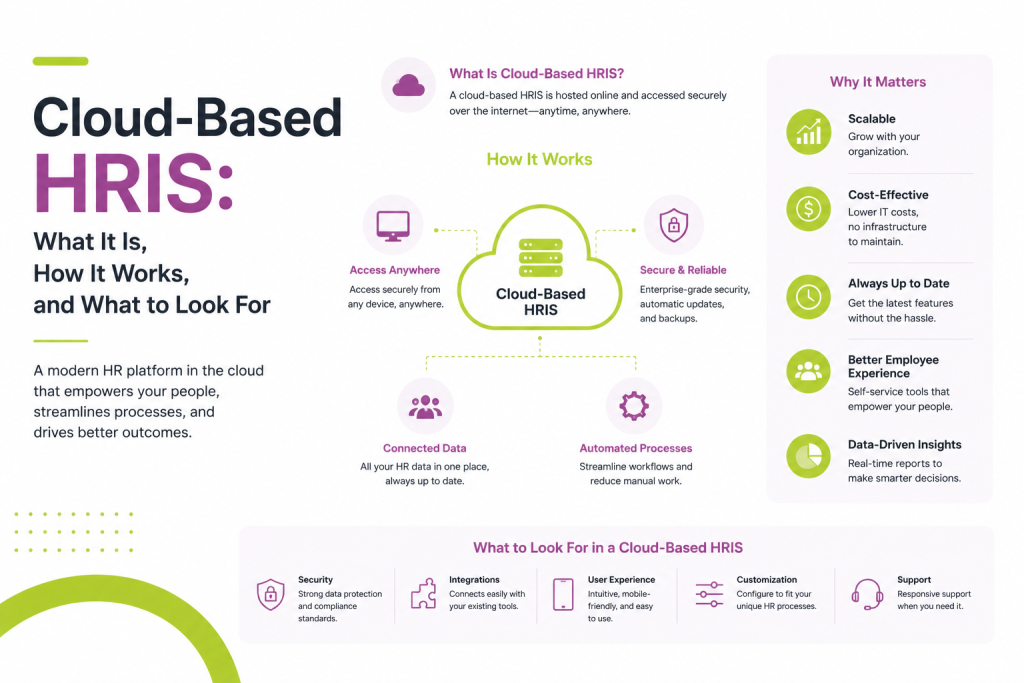
A Human Resource Information System (HRIS) is a software platform that centralizes employee data and automates core HR processes. It serves as the system of record for everything related to your workforce — who works for you, what they’re paid, what benefits they receive, how much time off they’ve taken, and whether your organization is meeting its compliance obligations.
The “cloud-based” distinction means the software is hosted on remote servers managed by the vendor and accessed over the internet, rather than installed on hardware your organization owns and maintains. You pay a subscription — typically per employee, per month — and the vendor handles infrastructure, security updates, and uptime.
This model is often called Software-as-a-Service (SaaS). It’s the same principle behind tools like Salesforce or Google Workspace: the complexity lives elsewhere, and you interact with the system through a clean interface.
Also read: What Does HRIS Stand For? (And Why the Answer Has Changed)
Cloud-based HRIS is distinct from a few related terms you’ll encounter:
- HCM (Human Capital Management) — A broader category that includes HRIS functionality plus talent management, workforce planning, and strategic analytics. Some vendors use HRIS and HCM interchangeably; others draw a clear line.
- HRMS (Human Resource Management System) — Often used synonymously with HRIS, though HRMS sometimes implies a heavier payroll and time-tracking emphasis.
- Payroll software — A subset of what an HRIS does. A standalone payroll tool processes compensation; an HRIS integrates payroll with the rest of the employee lifecycle.
For most mid-sized organizations, a cloud-based HRIS is the operational backbone of the entire HR function.
Also read: What is HRIS? A Plain-English Guide for HR Teams
How a Cloud-Based HRIS Works
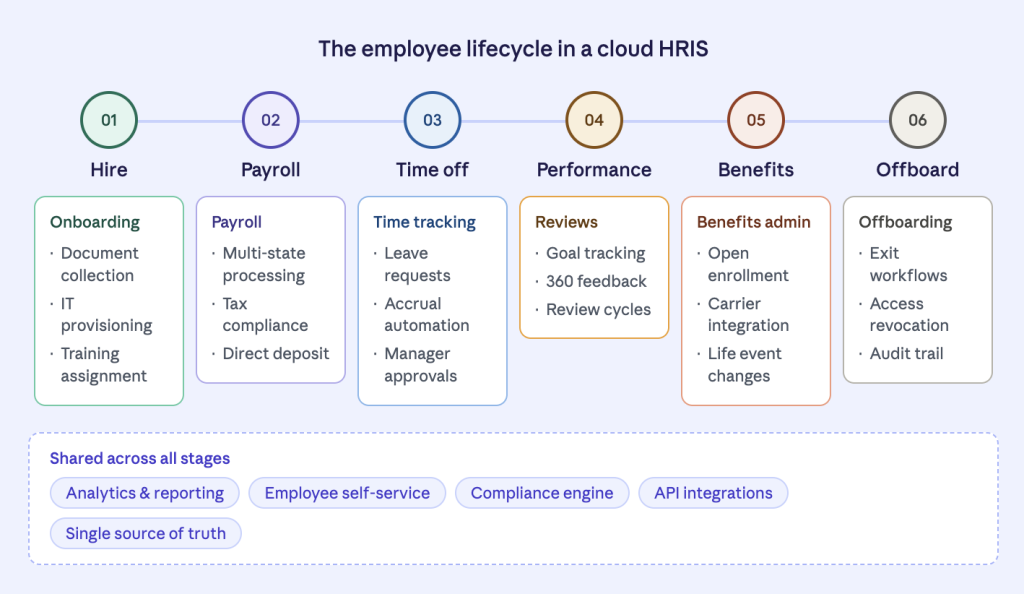
At its core, a cloud-based HRIS is a database — a structured repository of employee records connected to a set of workflows, automation tools, and reporting engines. Here’s how the major components fit together:
Employee Self-Service and the Single Source of Truth
Modern cloud HRIS platforms give every employee their own portal. Workers can update their personal information, view pay stubs, request time off, enroll in benefits, and access company documents without touching HR at all. This self-service model does two things simultaneously: it reduces the administrative burden on HR teams and it keeps data accurate, because employees are updating their own records rather than relying on HR to enter information manually.
That accuracy matters more than it might seem. When payroll, benefits, compliance reporting, and analytics all draw from the same underlying record, a single outdated address or incorrect tax withholding can cascade into multiple problems. The cloud HRIS becomes the single source of truth — one authoritative record that every other system references.
Workflows and Automation
One of the most tangible benefits of a cloud HRIS is workflow automation. Common processes — onboarding a new hire, processing a leave request, triggering a performance review cycle — follow defined steps that the system manages automatically.
When a new employee is added, the system can automatically trigger IT provisioning requests, assign compliance training, send benefits enrollment links, and set up a 90-day check-in reminder. Managers receive notifications when their direct reports submit time-off requests. Payroll runs pull updated hours from the timekeeping module without manual data entry.
This automation reduces error, speeds up processes, and frees HR professionals to focus on work that actually requires human judgment.
Integrations and the Ecosystem
No HRIS operates in isolation. Cloud-based platforms are built to connect with the tools surrounding them through APIs — standardized interfaces that let different software systems exchange data. A well-integrated HRIS will sync with your applicant tracking system (ATS), your accounting software, your learning management system (LMS), and your identity and access management tools.
This interconnectedness is what separates a modern cloud HRIS from the siloed on-premise systems of the past. Data flows between systems rather than being re-entered manually, and the HRIS can serve as a hub that keeps every connected tool in sync.
Reporting and Analytics
Because the cloud HRIS centralizes workforce data, it’s also positioned to generate meaningful analytics. Turnover rates by department, time-to-fill for open roles, headcount trends, overtime distribution, compensation equity analysis — all of this becomes reportable from a single platform rather than requiring exports and manual spreadsheet work.
More sophisticated platforms offer predictive analytics: identifying employees who may be at flight risk based on engagement signals, projecting future headcount needs, or flagging compliance gaps before they become violations.
Also read: How AI is Revolutionizing Compensation Budgeting: The Stello AI Advantage
Key Benefits Over On-Premise Systems
The shift to cloud-based HRIS delivers concrete advantages that go beyond convenience:
Lower total cost of ownership. On-premise systems require server hardware, IT maintenance, and expensive version upgrades. Cloud HRIS moves those costs to the vendor. You trade capital expenditure for predictable operating expense.
Faster implementation and updates. A cloud HRIS can typically be deployed in weeks rather than months, and updates roll out automatically without requiring internal IT involvement. Your system improves continuously rather than sitting on a version from three years ago.
Remote accessibility. Because the system runs in a browser, employees and HR teams can access it from anywhere. This matters for distributed teams, remote work arrangements, and managers who need to approve requests while traveling.
Scalability. Adding employees to a cloud HRIS is straightforward — you’re not provisioning new hardware or buying additional licenses with long lead times. The system scales with your organization.
Security and compliance infrastructure. Reputable cloud HRIS vendors invest heavily in security certifications (SOC 2, ISO 27001), data encryption, and regional compliance frameworks (GDPR, CCPA). For most organizations, the vendor’s security posture exceeds what they could build internally.
What to Look For When Evaluating a Cloud-Based HRIS
The market is crowded. Workday, BambooHR, Rippling, ADP Workforce Now, UKG, Paylocity, Gusto, and dozens of others all compete for HR budgets. Here’s what actually separates strong platforms from disappointing ones:
Core Functionality That Matches Your Needs
Start with your actual requirements. A 40-person startup needs something different from a 4,000-person enterprise. Identify which modules matter most for your stage — is payroll processing the priority, or talent management, or compliance tracking? Avoid paying for sophisticated functionality you won’t use in the next two years.
Ease of Use for Non-Technical Users
HR professionals are not software engineers. The system your team uses every day needs to be genuinely intuitive, not just trainable. During demos, pay attention to how many clicks common tasks require, whether the interface is self-explanatory, and how the mobile experience holds up. A system with powerful features but poor usability will see low adoption and manual workarounds.
Integration Depth
Ask specifically about integrations with the tools you already use. A listed integration isn’t always a deep one — some are basic data syncs that still require manual reconciliation. Understand what data flows bidirectionally, how frequently it syncs, and whether the integration is native or requires a third-party middleware tool.
Customer Support and Onboarding
Implementation quality varies dramatically between vendors. Ask for references from organizations of similar size and complexity. Understand what onboarding support is included versus charged separately. Evaluate response times and support channel availability — a critical payroll issue at 4pm on a Friday needs a fast path to resolution.
Compliance Coverage for Your Jurisdictions
If you operate across multiple states or countries, compliance becomes complex quickly. Verify that the platform maintains up-to-date compliance rules for your specific geographies, handles multi-state payroll correctly, and provides audit trails sufficient for employment law documentation requirements.
Reporting Flexibility
Built-in reports cover common use cases, but HR leaders inevitably need custom analysis. Evaluate how easy it is to build ad hoc reports without vendor involvement, whether data can be exported cleanly, and whether the analytics capabilities will scale with your needs.
Pricing Transparency and Contract Terms
HRIS pricing is rarely straightforward. Base per-employee-per-month rates often exclude payroll processing, implementation fees, premium support tiers, and add-on modules. Get a fully loaded total cost estimate and understand what happens to your data if you decide to switch vendors — data portability should be contractually guaranteed.
Making the Right Choice
A cloud-based HRIS is a long-term investment that touches every person in your organization. The right platform reduces administrative burden, improves data accuracy, keeps you compliant, and gives HR leadership the analytics they need to make strategic decisions. The wrong one creates more work than it eliminates and quietly erodes trust in HR processes.
Take the time to map your current pain points before evaluating vendors, run a structured demo process with real scenarios from your daily work, and involve the people who will actually use the system — not just the decision-makers who will sign the contract.
The best HRIS is the one your team actually uses. Everything else follows from that.
FAQs-
1. What’s the difference between a cloud-based HRIS and traditional on-premise HR software?
On-premise HR software is installed on servers your organization owns and maintains. Your IT team handles updates, security patches, and hardware upgrades — all of which are costly and time-consuming. A cloud-based HRIS is hosted by the vendor and accessed through a browser. You pay a subscription, the vendor manages the infrastructure, and updates roll out automatically. For most organizations, the cloud model means lower long-term costs, faster implementation, and a system that’s accessible from anywhere.
2. Is a cloud-based HRIS secure enough for sensitive employee data?
Yes — in most cases, a reputable cloud HRIS offers stronger security than what organizations could build and maintain internally. Leading vendors hold certifications like SOC 2 Type II and ISO 27001, encrypt data both in transit and at rest, and employ dedicated security teams focused exclusively on protecting the platform. That said, security is a shared responsibility: your organization still needs to enforce strong access controls, multi-factor authentication, and sensible user permission policies on your end.
3. How long does it take to implement a cloud-based HRIS?
Implementation timelines vary based on company size, the complexity of your payroll setup, how many integrations you need, and how clean your existing data is. A small business with straightforward needs might be live in two to four weeks. A mid-sized organization implementing a full suite — including payroll, benefits, and time tracking — typically takes two to four months. Enterprise deployments with complex configurations and global payroll can run six months or longer. Vendor-provided implementation support and the quality of your internal project ownership both significantly affect how smoothly it goes.
4. Can a cloud-based HRIS handle payroll for employees in multiple states or countries?
Many can, but not all do it equally well. Multi-state payroll in the U.S. involves different tax rules, wage and hour laws, and reporting requirements for each state — and these regulations change frequently. Global payroll adds currency, local labor law, and statutory benefit complexity on top of that. Before committing to a platform, verify specifically which states or countries it supports natively, how it handles compliance updates, and whether international payroll is included in the base price or treated as a separate, often expensive, add-on.
5. What happens to our data if we decide to switch HRIS vendors?
This is one of the most important questions to ask before signing a contract, not after. Most reputable vendors allow you to export your data, but the format, completeness, and ease of that export varies widely. Some platforms provide clean, structured exports in standard formats; others make it unnecessarily difficult. Before committing, confirm in writing that you own your data, that you can export it in a usable format at any time, and what happens to your data after contract termination. Vendor lock-in is a real risk in this category — data portability should be a non-negotiable contractual term.